Aug 13, 2026
Co-Teacher Assignments
A co-teacher you invite now starts holding nothing until you decide, group boundaries hold everywhere a teacher can touch the class, and the class workspace keeps your sidebar with you instead of leaving it at the door.
A New Co-Teacher Starts With Nothing, Until You Decide
Inviting someone to co-teach used to hand them the whole class the moment they accepted. Now they arrive assigned to nothing and see a short waiting screen until you give them groups, either from the Roster tab or by pre-assigning groups to the invite before they even sign up. Giving someone the whole class is still one click away and free on every account; splitting the class group by group is still a Lecturer Pro feature.
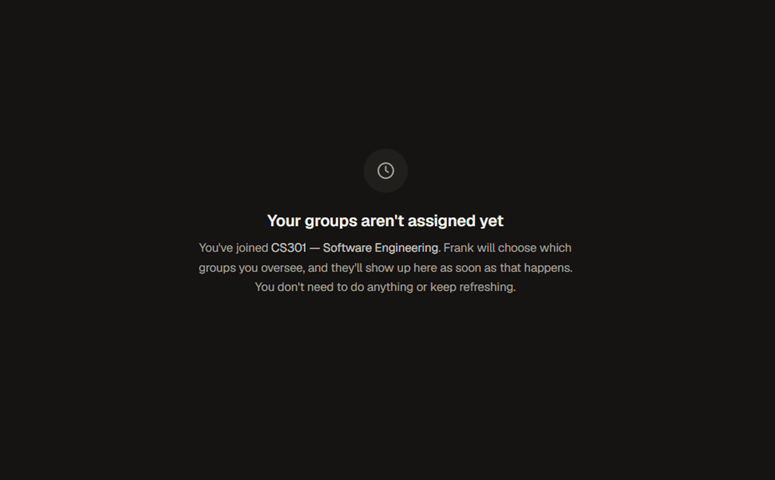
Every co-teacher already in your class keeps exactly what they had. This only changes what a brand new invite starts with.
Group Boundaries Hold Everywhere
A teacher limited to specific groups now stays inside those groups everywhere in class management, the same as in Monitor, Integrity, Participation, Roster and the boards themselves.
Roster Housekeeping
Deleting several groups in a row from the Roster tab could quietly drop all but the last one, restorable only by refreshing and starting over. Each deletion now carries its own undo, so removing three groups back to back removes exactly three. Monitor also used to sort groups alphabetically no matter how you'd arranged them in Roster; it now shows them in the same order you set.
The Class Workspace Keeps Your Sidebar
Monitor, Roster and the other class panels never rendered your app sidebar, so notifications and sign-out were only reachable by leaving the class first. They now sit inside the same shell as your personal boards: the sidebar stays mounted as you move between a class and a board, and your notifications and account menu are always one click away.
Mentions by handle, and the “who is this” card everywhere
Two students with the same name used to show up as identical @mention chips, distinguishable only by hovering. Mentions and comment authors now render by handle instead, which is unique. Hovering a name for a quick “who is this” card also now works consistently: it was missing from a task's activity log, its description history, and the assignee stack, and now shows up in all three the same way it already did on cards and comments.
And a Batch of Fixes
The dialog for choosing which groups a co-teacher covers reads clearer too: the whole-class toggle used to look like just another row in the list below it, and now sits apart as its own switch, with the individual groups dimming while it's on since they're following it rather than being chosen on their own. Submitting the signup form the instant you finished typing a username could refuse you while it was still checking availability, even though the name was fine; it now waits for that answer instead of guessing. A failed roster invite email couldn't be recovered by re-importing the same file; the roster tab now lists exactly who didn't get one and can resend to all of them at once. “Load more” on a board past 100 tasks did nothing at all; it now actually loads the next page. Ten people opening a brand new board at once could seed it with a pile of duplicate columns instead of the usual three. And boards stay in sync more reliably on a slow or flaky connection, including recovering cleanly from a request that never comes back.